
1/ Previewing bat recordings
This preview is a quick review, including a look your bat recordings spectrograms and possibly playback of sounds. You can usually use the application that you recorded the bats in, to quickly to this either in the field, or at a later date. This is often useful just to double check what you fleetingly saw go past on the screen.
Previewing in the recording App.
BatGizmo (Android)
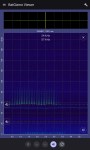
To review previously recorded file(s) go to the menu (three horizontal lines) at the top of the screen and select “View file(s)“.
You can then browse for the file(s) you would like to open. The default save location for BatGizmo is:
- Devices internal storage > Documents > BatGizmo > YYYY-MM-DD (relevant date)
Click on one file, or to select multiple files click and hold, then click “Select” top right. Once the (first) file is open you can play it by tapping the speaker icon at the bottom of the screen. To preview another selected file, click the up and down arrows at the bottom of the screen.
BatDetector (iOS)
To review a previously recorded file, go to the “Files” app, and open the default save location for Bat Detector which is:
- Files > On My iPhone > Bat Detector > Bat_Walk_DD-MM-YYYY (relevant date)
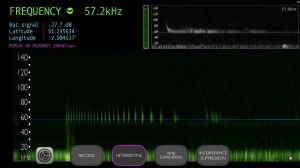
Tap on the file you would like to review and it will open “re-playing” in Bat Detector, the spectrogram and the filename change colours to reflect “Replay”. Turn on Heterodyne or Time Expansion in the usual way to hear it.
To preview another pre-recorded file you have to repeat the above process.
In Bat Detector, while recording, you can scroll left to stop recording and preview the previously recorded files. You can swipe left or right to go back and forwards, and have to get to either end to re-enable recording or click on the microphone icon on the bottom left.
Echo Meter (iOS & Android)
Note: This app. can only be used with Echo Meter Touch microphones.
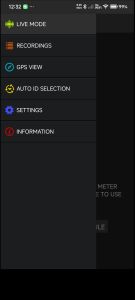
To review a previously recorded file go to the menu (three horizontal lines) at the top left of the screen and select “RECORDINGS“.
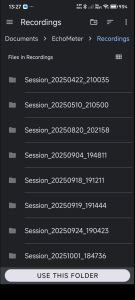
You can then sort by species, or time, to browse for the file you would like to open, and click on it. The default save location for EchoMeter is:
- Android: Internal or SD > Documents > EchoMeter > SPPSPP_YYYYMMDD_HHMMSS (Species_Date_Time)
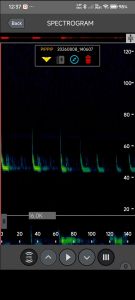
Once the file is open you can click the play button to review.
To preview another file, click the up/down arrows at the bottom of the screen, or go back to the file list to select a totally different file.
In Echo Meter app you can scroll right to go back in time to look at recent calls, however this is not recommended, as on slower/older devices as it can cause the app to stop recording or hang.
Other Preview Apps
Bat AI
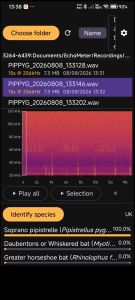
This is early release of an App for Android which shows great promise. It allows you to view all the recordings in a folder, then select any file from that list to display a spectrogram. You can playback in Heterodyne or Time Expansion AND “Identify species” for the selected recording while offline, not requiring an internet connection. The autoID results do seem variable in confidence value, but usually are pointing in the right direction.
The app is currently free, but does contain ads.
Click here for more details about the Bat AI app, taken from their website.
Bat AI by Paludour (contains ads) – An early release of an App for Android which shows great promise.
“Bat AI is a powerful tool for bat enthusiasts and nature lovers. Effortlessly analyze and identify bat species from your own audio recordings using state-of-the-art AI models.
- Works offline, no internet required for classification.
- Browse and select .wav files directly from your device.
- Visualize bat calls with interactive spectrograms.
- Classify bat species using advanced neural networks trained for different regions (EU, UK, Sweden, USA).
- Get confidence scores for each identification.
- Customize playback speed and frequency range for detailed analysis
- The app relies on BattyBirdNET – Bat Sound Analyser https://github.com/rdz-oss/BattyBirdNET-Analyzer“
Next Page > 2/ Transfer your recordings

