
6. Prepare the stencil
To apply solder paste accurately to your Printed Circuit Boards (PCB) you will need to have purchased the correct stencil (non framework version).
The stencil is a thin sheet of metal with accurate holes cut exactly where the silver solder pads are on the PCB. To use it you need to make a PCB holding framework, to allow repeated accurate placement of the stencil over many PCBs.
1/ Unpacking – The stencil comes packed in some oversized offcuts of 6mm MDF board. Do not throw this away, as it makes the perfect base and cover for the PCB holding framework
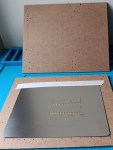
2/ Position PCB & Stencil – Put a PCB on the board and lay the stencil over the top of it. Move the PCB and stencil around, and you are aiming to position:
- The Stencil – Central on the board, just a little bit below the middle.
- The PCB – So when the stencil is in the above position, ALL the silver pads on the PCB are visible through the holes on the stencil.
When happy draw an outline around the stencil and PCB.
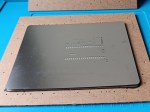
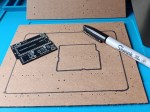
3/ Place offcuts – Using the offcuts from preparing the PCBs, choose carefully the ones that best fit around the PCB, and temporarily place in position to check best fit. To aid PCB removal it is often useful to leave one corner of the PCB easily accessible.
Then choose other offcuts to from an outline to support the edges of the stencil, this prevents it bending when applying paste. Aim to allow some overlap of the stencil at the top and bottom, while supporting as much of the surface area of the stencil as possible.
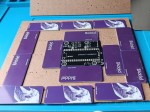
4/ Glue down framework – You can use hot melt glue to fix the offcuts in place, but we prefer the ease of superglue. Apply glue to the back of the offcut and press down into place. Be careful not to get glue on the PCB.
When two central PCB framing offcuts are in place, leave to dry, and start on the offcuts for the outline of the stencil.
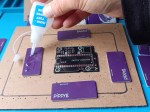
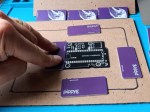
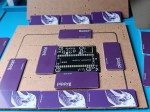
5/ Finish framework – Glue down the last two offcuts to hold the PCB in place.
Then complete the outline of the stencil framework, but placing the final offcuts.
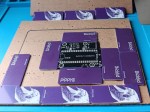
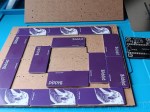
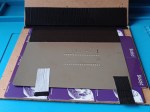
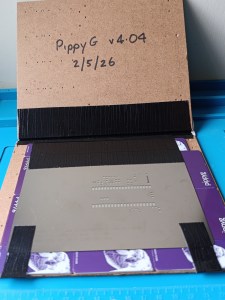
6/ Cover (optional) – We like to use the top piece of packing as a hinged cover to protect the thin metal stencil. To make this put the stencil on top of the completed framework, and place the top packing on top to sandwich it.
Using gaffer tape or similar make a hinge over the top of the two MDF sheets.
Open up the cover, and pull the two boards are far apart as possible. Then use a second piece of Gaffer tape to cover the sticky inside of the hinge.
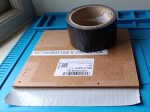
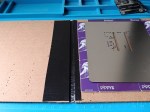
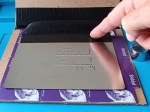
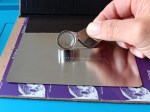
7/Position stencil – Lastly you need to accurately position the stencil. Place a PCB in the framework, and attach a piece of gaffer tape to the half way over the top of the stencil. Holding the tape back, CAREFULLY position the stencil exactly over the PCB. Check the corners and especially the microphone are precisely aligned with a hand lens. When happy, press the top of gaffer tape down to fix the position of the stencil. This tape acts like a hinge.
Finally cut two tape strips to hold the bottom corners of the stencil.
Next page > 7. Flash Picos with Firmware

