
2. Ordering from PCBWay
The designer Phil has made his Printed Circuit Boards, solder paste stencils and 3D printed back covers available from PCBway in China. Delivery to UK usually takes 8 to 12 working days from ordering.
Visit the “Phil Phil Atkin” page on PCBway to see all his device designs:
For UK and EU customers, changes to import duties are coming, click here for details.
For UK customers:
Currently, commercial goods sent to Great Britain from abroad with a value of £135 or less are exempt from Customs Duty, though import VAT may still apply. However, the UK government has announced plans to phase out this £135 low-value exemption entirely by March 2029 (with implementation discussions targeting late 2028)
Regarding EU customers, the following is copied from the PCBway checkout page:
“Starting July 1, 2026, the EU will remove the customs duty exemption for low-value imports from outside the EU. B2C shipments to EU countries with goods valued at USD 150 or less may be subject to a temporary EUR 3 customs duty per item/declaration line. Please refer to the details below.”
https://www.pcbway.com/blog/News/EU_Customs_Reform_2026_End_of_the_150_Duty_Exemption_for_Low_Value_Imports_2ec7a7f4.html
More details: https://taxation-customs.ec.europa.eu/news/guidance-and-legal-text-temporary-flat-fee-low-value-imports-which-will-apply-until-1-july-2028-2026-06-08_en
Click on the device you are interested in. Then there are three stages to the ordering process:
- Order your PCB’s
- You have to order a Stencil for each type of device (Frameless). This is done with PCB’s above.
- Then order 3D print back covers/cases. Note: Not required for mini Griff, but are required for:
- All mini and nano Pipistrelle
- PippyG
- BatSynth1
- Griff if using a back cover (not required if mounting the brooch clip directly onto the Griff PCB)
1. Order PCB’s
PCBs used to cost $5 for 10, plus shipping cost. However in September the prices changed so now only 5 Green PCB are $5, the other PCB colours are now $18.18 for 5 or 10 (so order 10!)
Then as quantity ordered is increased above 10, the unit price initially increases, then only decreases as the quantity ordered is raised even higher.
Click here for current (Sept ’26) PCBway pricing advice for PCBs (exc. delivery)
All the prices below are with the default silkscreen colour, if you change this the price increases.
For some reason Green is treated differently
- 5 PCB in Green = $5 = $1 each
- 10 PCB in Green = $18.18 = $1.82 each
- … then the prices match those of the standard colours below
Hence for Green PCB you should buy in small batches of 5.
For the “standard” colours of Red/Yellow/Blue/White or Black
- 5 or 10 PCB in Red/Yellow/Blue/White or Black = $18.18 = $1.82 each
The unit price of 15 or 20 is usually higher than unit price for ten, hence either buy 10, or in large quantities. The quantity needed to decrease the price below $1.82 each, varies by design:
- For mini Griff order 20+: 20 Std col. mini Griff = $34.80, = $1.74 each
- For Griff order 50+: 50 Std col. Griff = $84.67, = $1.69 each
- For nano Pipistrelle order 20+: 20 Std col. nanoPip = $35.58, = $1.80 each
- For mini Pipistrelle order 30+: 30 Std col. miniPip = $49.58, = $1.65 each
- For PippyG order 20+: 20 Std col. PippyG = $34.01, = $1.70 each
- For BatSynth order 50+: 50 Std col. BatSynth = $90.26, = $1.81 each
For the “non standard” colours of Purple, Matte Black or Matte Green
The prices of these have ALWAYS been high, apart from the occasional special offer when none standard colours like Purple are the same price as standard colours.
Hence we can only really recommend buying the non standard colours if they are on special offer, or buying in big quantities (40+).
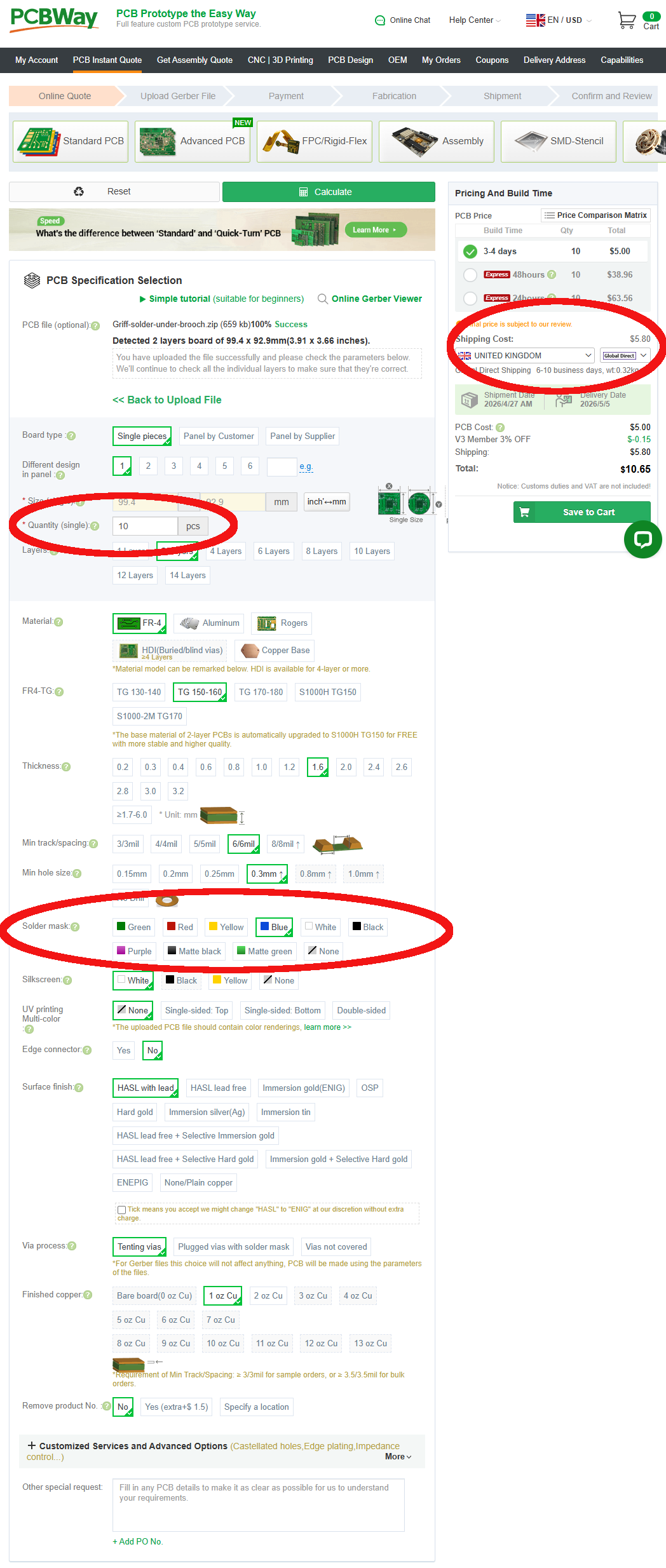
On the next screen you only need to change 3 fields. These are listed below, and also shown circled in red.
Leave everything else as its default.
- Quantity (single) = 10 pcs
Reason: 5 PCB in standard colours cost the same as 10 = $18.18 (except Green). If you go just over 10 they each cost more, until you get large quantities. - Solder Mask = Green, Red, Yellow, Blue, White or Black
Reason: Purple, Matte black or green & None are more expensive.
Leave the Silkscreen below at its default. It will be White, unless you select White Solder Mask when it changes to Black. - Shipping Cost = Your country and “Global Direct”
Reason: Global direct is cheapest/fastest. Customs duties and VAT are not paid, but we have never had an issue with them over many orders.
Click here to see all the default values
- Board type = Single pieces
- Different design in panel = 1
- Size: is generated automatically from the “PCB file”
- Quantity = 10 (changed from default of 5!)
- Layers = 2 Layers
- Material = FR-4
- FR4-TG = TG 150-160
- Thickness = 1.6mm
- Min track/spacing = 6/6mil
- Min hole size = 0.3mm
- Solder mask = Change to Green, Red, Yellow, Blue, White or Black (from default of Green)
- Silkscreen = white (usually, unless While solder mask selected)
- UV printing Multi-colour = None
- Edge connector = No
- Surface Finish = HASL with lead
- Via Process = Tenting vias
- Finished Copper – 1oz Cu
- Remove Product = No
2. Order solder paste Stencil
To accurately apply the solder paste to the PCB’s you will need a specific SMD stencil for each type of device (and each version of that device type). Each stencil should cost $10 plus shipping cost.
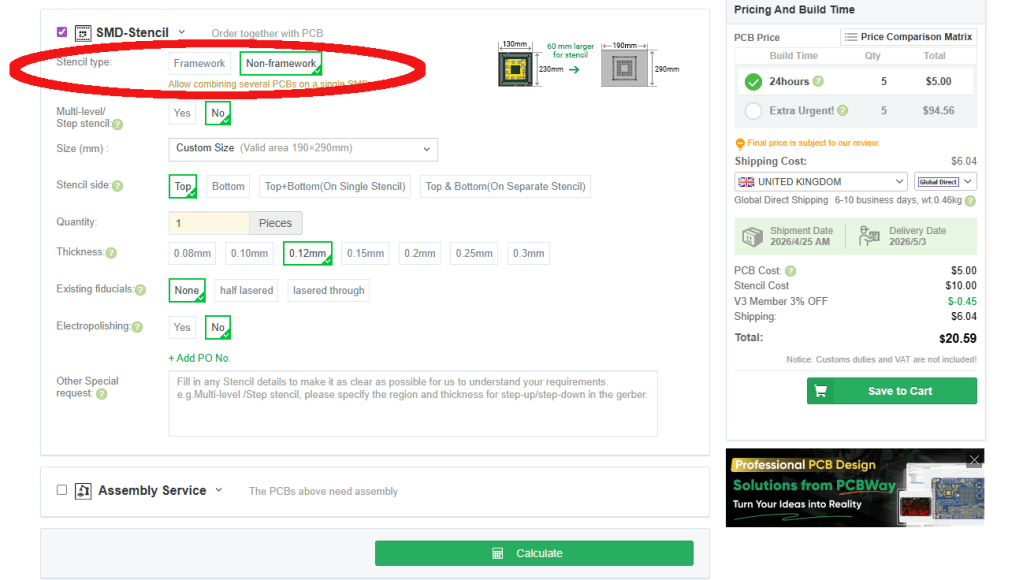
Scroll down on order page to the “SMD-Stencil section and click to expand it. You only need to change one field as below, and also shown circled in red:
- Stencil Type = Non-framework
Reason: “Framework” stencils will work, but are more expensive, heavier and cost more to ship.
Leave everything else at it’s default setting
Click here to see the SMD-Stencil defaults
- Stencil Type = Non-framework (changed from default of “Framework)
- Multi-level/Step stencil = No
- Size (mm): is generated automatically from the “PCB file”
- Stencil side = Top
- Quantity = 1
- Thickness = 0.12mm (the best for decent amount of solder paste per pad)
- Existing fiducials = None
- Electropolishing = No
- Other special request = Empty
Add PCB and Stencil to cart
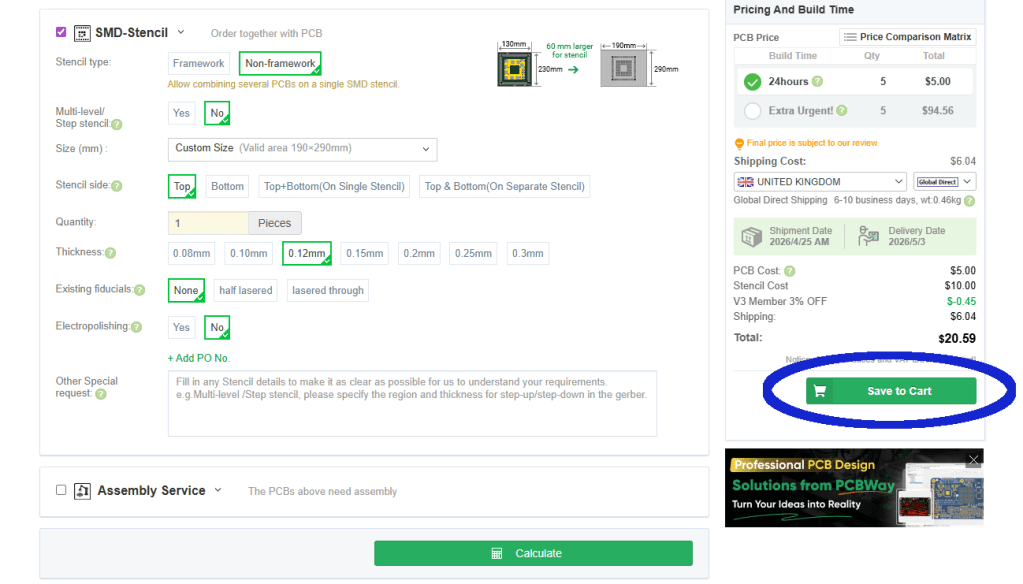
You should ignore the “Assembly Service” section, as PCBWay are not authorised to assemble these devices.
So review the selections made in 1. and 2. above, and when happy click the green “Save to Cart” Button on the left side. Shown circled in Blue.
Then agree the “Special Notes”
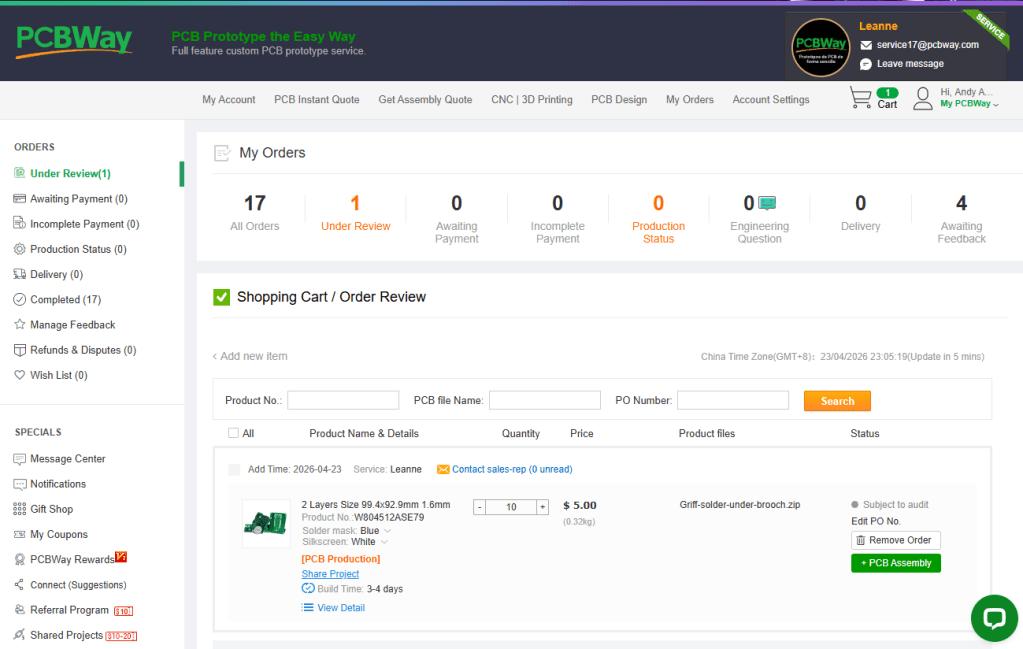
At the “CartList” page your “Shopping Cart/Order Review” will be “subject to review”. You cannot “proceed to checkout” yet.
The sales rep will review the order before opening it up for payment. This usually takes a few hours for PCBs and up to 2 days for 3D prints (depending on time zones).
I usually order several PCB/Stencils/3D prints at a time by returning to the “Phil Phil Atkin” page each time. And then wait until all have been reviewed, before paying. However if in a rush you can select to pay for one, or several of the orders as they are reviewed.
3. Order 3D prints (back cover/case)
You have to get 3D print back covers/cases for most devices including:
- All mini and nano Pipistrelle
- PippyG
- BatSynth1
- Griff if using a back cover (to reduce noise transfer)
Note: 3Dprints are NOT required for mini Griff, or Griff if you are mounting the brooch clip directly onto the Griff PCB.
The 3D print back cover/cases are one of the more expensive parts and vary in price from £2 to £4+ each depending on device, and ordering process.
Return to the “Phil Phil Atkin” page on PCBway and again click on the device you are interested in.
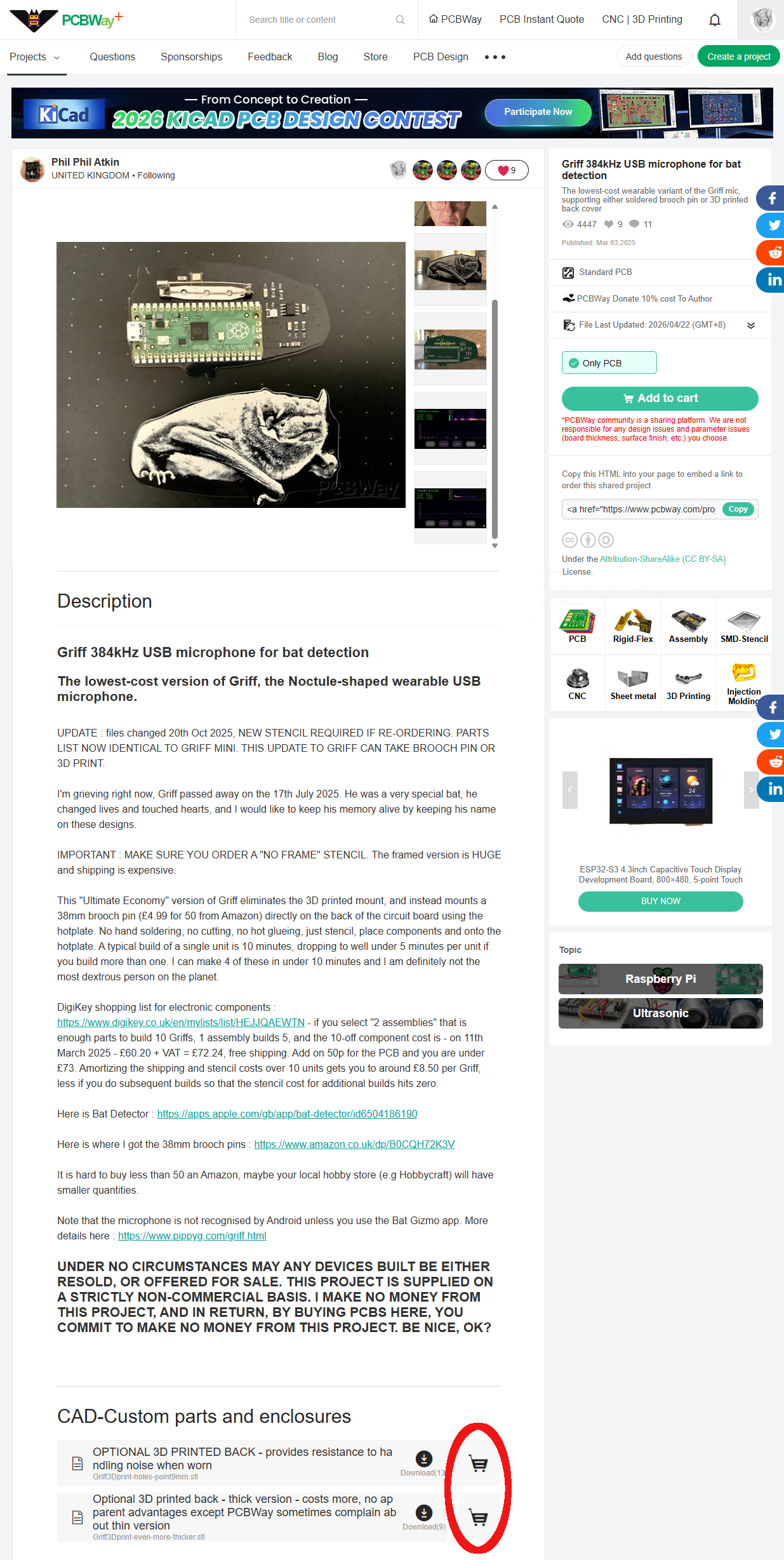
This time, scroll right down to the bottom of the page to the “CAD-Custom parts and enclosures” section.
There may be more than one option here, Phil usually adds some descriptions to help you choose. When ready click the Trolly icon next to the selected 3D print. Circled in red on the image.
Note: if you have your own 3D printer you have the option to download the .STL files to print your own at home, or via other commercial services. Sadly I’ve yet to find a UK based 3D printer than can deliver cheaper than PCBWay from China 😦
You can view the 3D print by downloading the .STL file then loading it into a free online STL viewer. e.g.
On the next page the selected print should be shown at the top. You have to configure the options then submit a “request for quote” to PCBway to get a price.
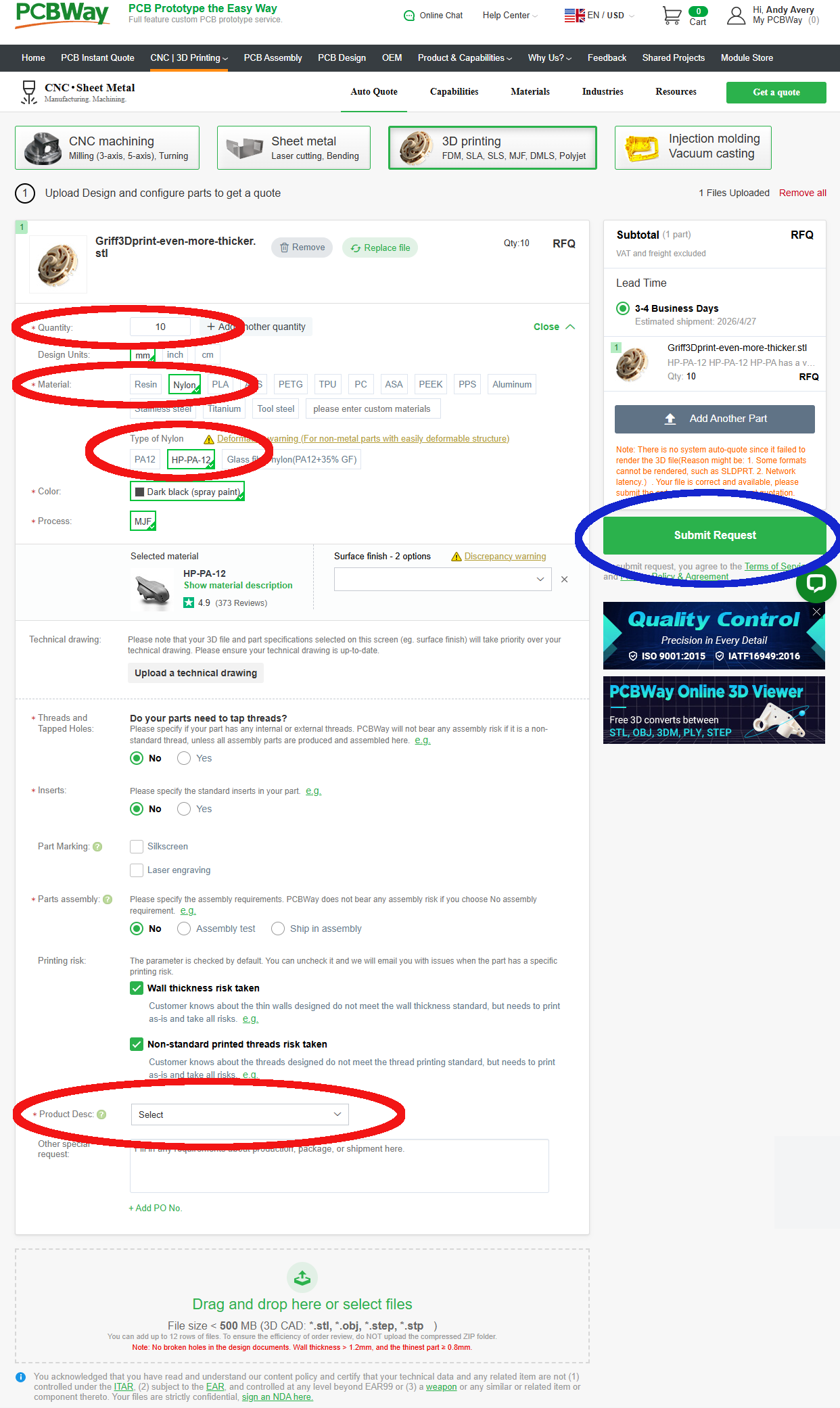
This time you need to change 4 (5) fields. These are listed below, and also shown circled in red.
- Quantity = Number of back covers you require
- Material = Nylon
Reason: It is tough and hard wearing - Type of Nylon = HA-PA-12
Reason: “The parts have excellent impact resistance, can be used repeatedly for a long time, have excellent heat resistance, and do not deform.” - Product Desc. = Audio and Video Appliance, then: Audio Equipment Enclosure (HSCode:851890)
Leave everything else at it’s default setting.
Click here to see the 3D printing defaults
- Quantity = Number of back covers you require
- Design Units = mm
- Material = Nylon (changed from default of Resin)
- Type of Nylon = HA-PA-12 (changed from default of PA12)
- Color = Dark black (spray paint) (defaults when HA-PA-12 is selected)
- Process = MJF (defaults when HA-PA-12 is selected)
- Technical drawing = Not required
- Threads and Tapped Holes = No
- Inserts = No
- Part Marking = None selected
- Parts assembly = No
- Printing risk – Wall thickness risk taken = Ticked
- Printing risk – None-standard printed threads risk taken = Ticked
- Product Desc. = Audio and Video Appliance, then: Audio Equipment Enclosure (HSCode:851890) (changed from blank)
- Other special request = Left blank
When ready click the green “Submit Request” button on the left. Circled in Blue on the image.
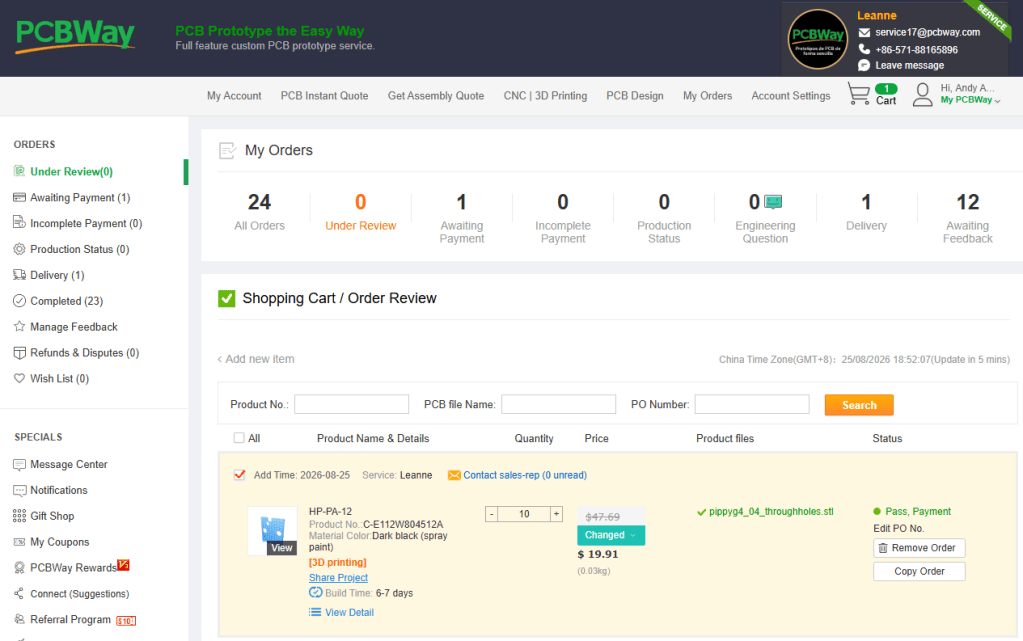
PCB will update your account within a working day or so with a price for the quantity of prints you require. They will send you an email to alert you that you can now pay for them, and follow the link in the email to complete the PCBway checkout process.
Note: The price from PCBway is for a custom job, and it may well vary by as much as 50%, even over two orders for the same print and quantity placed at the time. It all depends if the quote was generated automatically (which tends to result in higher prices), or on how the PCBway technician manually decides the 3D print should be made.
If you don’t like the first quote you can always ask the agent to review the price (We have often got 60% reductions just by asking). Then if after review, the price is still too high you could cancel, then re order to generate a new quote, however be aware, the price could go up as well as down!
Next > 3. Ordering Components

